

- Calling 100+ LLMs (OpenAI, Azure, Vertex, Bedrock) in the OpenAI format
- Using Virtual Keys to set Budgets, Rate limits and track usage
Quick Integration
Step 1. Start LiteLLM Proxy Server
LiteLLM Requires a config with all your models defined - we will call this filelitellm_config.yaml
Detailed docs on how to setup litellm config - here
Step 2. Start LiteLLM Proxy
http://localhost:4000
Step 3. Integrate LiteLLM Proxy in Dify
InSettings > Model Providers > OpenAI-API-compatible, fill in:
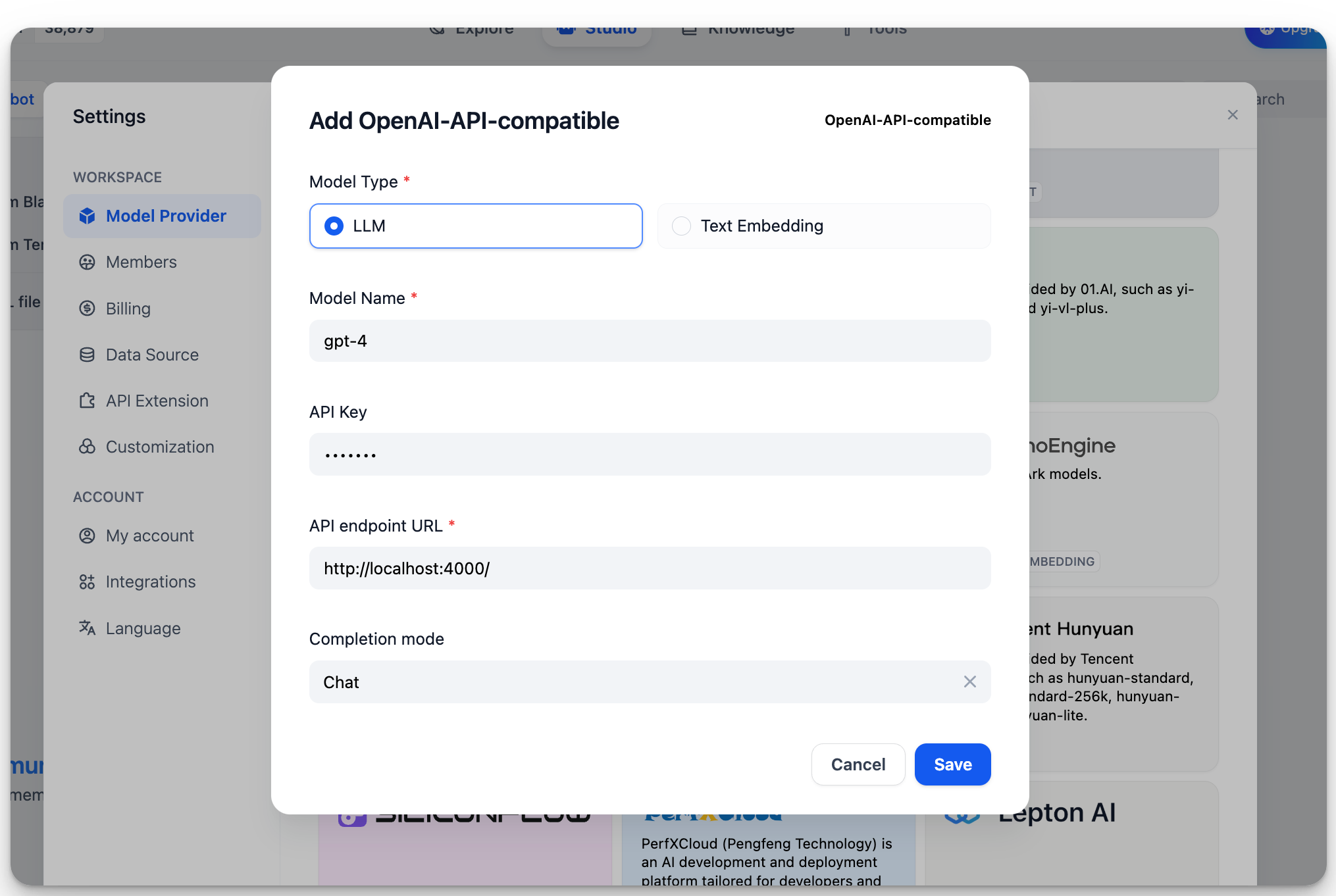
-
Model Name:
gpt-4 -
Base URL:
http://localhost:4000Enter the base URL where the LiteLLM service is accessible. -
Model Type:
Chat -
Model Context Length:
4096The maximum context length of the model. If unsure, use the default value of 4096. -
Maximum Token Limit:
4096The maximum number of tokens returned by the model. If there are no specific requirements for the model, this can be consistent with the model context length. -
Support for Vision:
YesCheck this option if the model supports image understanding (multimodal), likegpt4-o.
More Information
For more information on LiteLLM, please refer to:Edit this page | Report an issue