

This Documentation is Being Deprecated
This page is being phased out as part of our documentation reorganization.
Click this card to be redirected to the updated version with the most current information.
If you notice any discrepancies or areas needing improvement in the new documentation, please use the “Report an issue” button at the bottom of the page.
-
Create Module Structures by Model Type
Create corresponding sub-modules under the provider module based on model types (such as
llmortext_embedding). Ensure each model type has its own logical layer for easy maintenance and extension. - Write Model Request Code Create a Python file with the same name as the model type (e.g., llm.py) under the corresponding model type module. Define a class that implements specific model logic and complies with the system’s model interface specifications.
-
Add Predefined Model Configuration
If the provider offers predefined models, create
YAMLfiles named after each model (e.g.,claude-3.5.yaml). Write file content according to AIModelEntity specifications, describing model parameters and functionality. - Test Plugin Write unit tests and integration tests for newly added provider functionality to ensure all function modules meet expectations and operate normally.
Below are the access details:
1. Creation of different module structures by model type
A model provider may offer different model types, for example, OpenAI provides types such asllm or text_embedding. You need to create corresponding sub-modules under the provider module, ensuring each model type has its own logical layer for easy maintenance and extension.
Currently supported model types:
llm: Text generation modelstext_embedding: Text Embedding modelsrerank: Rerank modelsspeech2text: Speech to texttts: Text to speechmoderation: Content moderation
Anthropic as an example, since its model series only contains LLM type models, you only need to create an /llm folder under the /models path and add yaml files for different model versions. For detailed code structure, please refer to the GitHub repository.
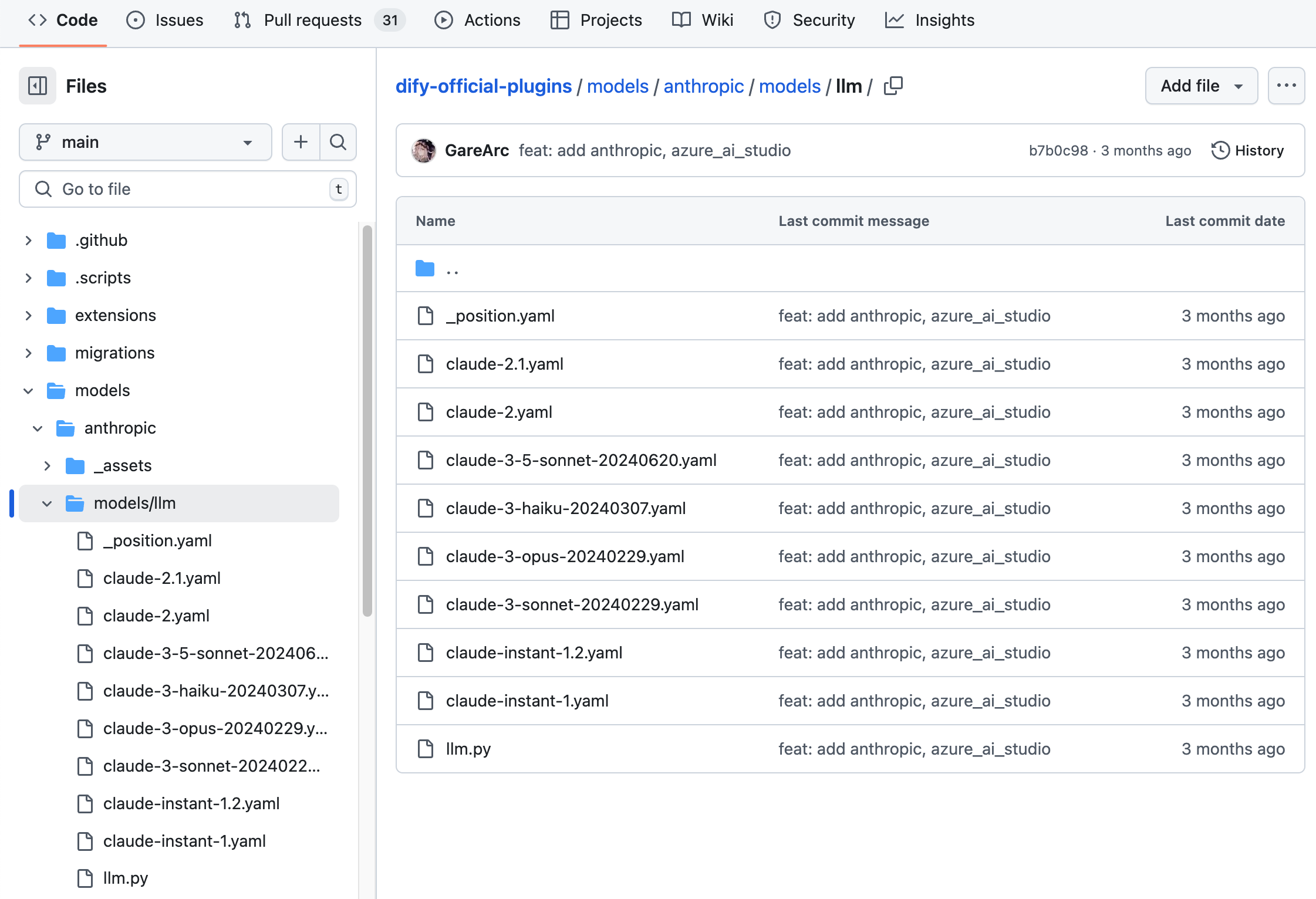
2. Writing Model Requesting Code
Next, you need to create anllm.py code file under the /models path. Taking Anthropic as an example, create an Anthropic LLM class in llm.py named AnthropicLargeLanguageModel, inheriting from the __base.large_language_model.LargeLanguageModel base class.
Here’s example code for some functionality:
- LLM Request The core method for requesting LLM, supporting both streaming and synchronous returns.
- Pre-calculated number of input tokens
- Request Exception Error Mapping Table
InvokeError type specified by Runtime, allowing Dify to handle different errors differently.
Runtime Errors:
InvokeConnectionError: Connection error during invocationInvokeServerUnavailableError: Service provider unavailableInvokeRateLimitError: Rate limit reachedInvokeAuthorizationError: Authorization failure during invocationInvokeBadRequestError: Invalid parameters in the invocation request
3. Add Predefined Model Configurations
If the provides predefined models, create YAML files for each model with the same name as the model name (e.g. claude-3.5.yaml). Write the contents of the file according to the AIModelEntity specification, describing the parameters and functionality of the model.claude-3-5-sonnet-20240620 Model example code:
4. Debugging Plugins
Dify provides remote debugging method, go to “Plugin Management” page to get the debugging key and remote server address. Check here for more details:Debug Plugin
Publishing Plugins
You can now publish your plugin by uploading it to the Dify Plugins code repository! Before uploading, make sure your plugin follows the plugin release guide. Once approved, the code will be merged into the master branch and automatically live in the Dify Marketplace.Exploring More
Quick Start:- Develop Extension Type Plugin
- Develop Model Type Plugin
- Bundle Type Plugin: Package Multiple Plugins
Edit this page | Report an issue