

Why is Hybrid Search Needed?
The mainstream method in the retrieval phase of RAG (Retrieval-Augmented Generation) is vector search, which matches based on semantic relevance. The technical principle involves splitting the documents in the external knowledge base into semantically complete paragraphs or sentences, converting them into a series of numbers (multi-dimensional vectors) that the computer can understand, and performing the same conversion on the user’s query. The computer can detect subtle semantic relationships between the user’s query and the sentences. For example, “cats chase mice” and “kittens hunt mice” will have a higher semantic relevance than “cats chase mice” and “I like eating ham.” After finding the most relevant text content, the RAG system provides it as context for the user’s query to the large model, helping it answer the question. In addition to enabling complex semantic text retrieval, vector search has other advantages:- Understanding similar semantics (e.g., mouse/mousetrap/cheese, Google/Bing/search engine)
- Multilingual understanding (cross-language understanding, such as matching English input with Chinese)
- Multimodal understanding (support for similar matching of text, images, audio, video, etc.)
- Fault tolerance (handling spelling errors and vague descriptions)
- Searching for names of people or objects (e.g., Elon Musk, iPhone 15)
- Searching for abbreviations or phrases (e.g., RAG, RLHF)
- Searching for IDs (e.g.,
gpt-3.5-turbo,titan-xlarge-v1.01)
- Exact matching (e.g., product names, personal names, product numbers)
- Matching with a few characters (vector search performs poorly with few characters, but many users tend to input only a few keywords)
- Matching low-frequency words (low-frequency words often carry significant meaning in language, such as “Would you like to have coffee with me?” where “have” and “coffee” carry more importance than “you” and “like”)
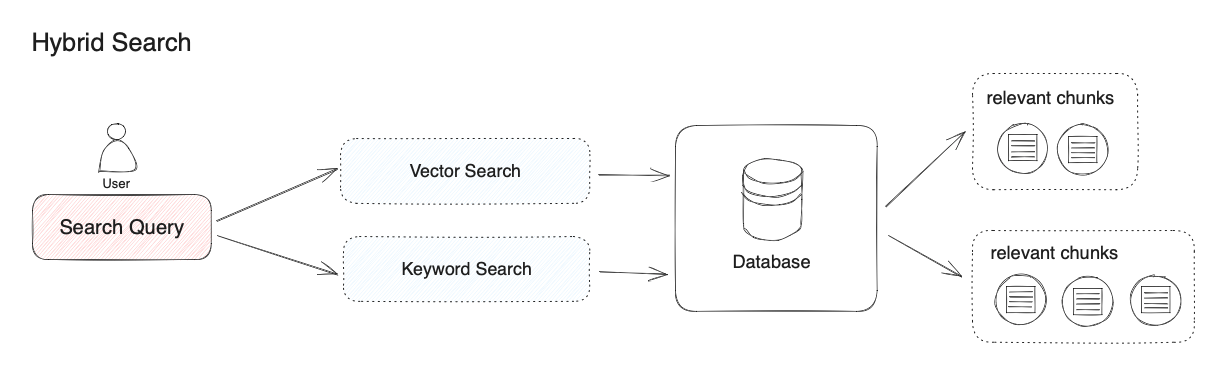 “Hybrid search” does not have a precise definition. This article uses the combination of vector search and keyword search as an example. If we use other combinations of search algorithms, it can also be called “hybrid search.” For instance, we can combine knowledge graph techniques for retrieving entity relationships with vector search techniques.
Different retrieval systems excel at finding various subtle relationships between texts (paragraphs, sentences, words), including exact relationships, semantic relationships, thematic relationships, structural relationships, entity relationships, temporal relationships, event relationships, etc. No single retrieval mode can be suitable for all scenarios. Hybrid search achieves complementarity between multiple retrieval technologies through the combination of multiple retrieval systems.
“Hybrid search” does not have a precise definition. This article uses the combination of vector search and keyword search as an example. If we use other combinations of search algorithms, it can also be called “hybrid search.” For instance, we can combine knowledge graph techniques for retrieving entity relationships with vector search techniques.
Different retrieval systems excel at finding various subtle relationships between texts (paragraphs, sentences, words), including exact relationships, semantic relationships, thematic relationships, structural relationships, entity relationships, temporal relationships, event relationships, etc. No single retrieval mode can be suitable for all scenarios. Hybrid search achieves complementarity between multiple retrieval technologies through the combination of multiple retrieval systems.
Vector Search
Definition: Generating query embeddings and querying the text segments most similar to their vector representations. TopK: Used to filter the text fragments most similar to the user’s query. The system will dynamically adjust the number of fragments based on the context window size of the selected model. The default value is 3. Score Threshold: Used to set the similarity threshold for filtering text fragments, i.e., only recalling text fragments that exceed the set score. The system’s default is to turn off this setting, meaning it does not filter the similarity values of recalled text fragments. When enabled, the default value is 0.5. Rerank Model: After configuring the Rerank model’s API key on the “Model Providers” page, you can enable the “Rerank Model” in the retrieval settings. The system will perform semantic re-ranking on the recalled document results after semantic retrieval to optimize the ranking results. When the Rerank model is set, the TopK and Score Threshold settings only take effect in the Rerank step.Full-Text Search
Definition: Indexing all words in the document, allowing users to query any word and return text fragments containing those words. TopK: Used to filter the text fragments most similar to the user’s query. The system will dynamically adjust the number of fragments based on the context window size of the selected model. The default value is 3. Rerank Model: After configuring the Rerank model’s API key on the “Model Providers” page, you can enable the “Rerank Model” in the retrieval settings. The system will perform semantic re-ranking on the recalled document results after full-text retrieval to optimize the ranking results. When the Rerank model is set, the TopK and Score Threshold settings only take effect in the Rerank step.Hybrid Search
Simultaneously performs full-text search and vector search, applying a re-ranking step to select the best results matching the user’s query from both types of query results. Requires configuring the Rerank model API.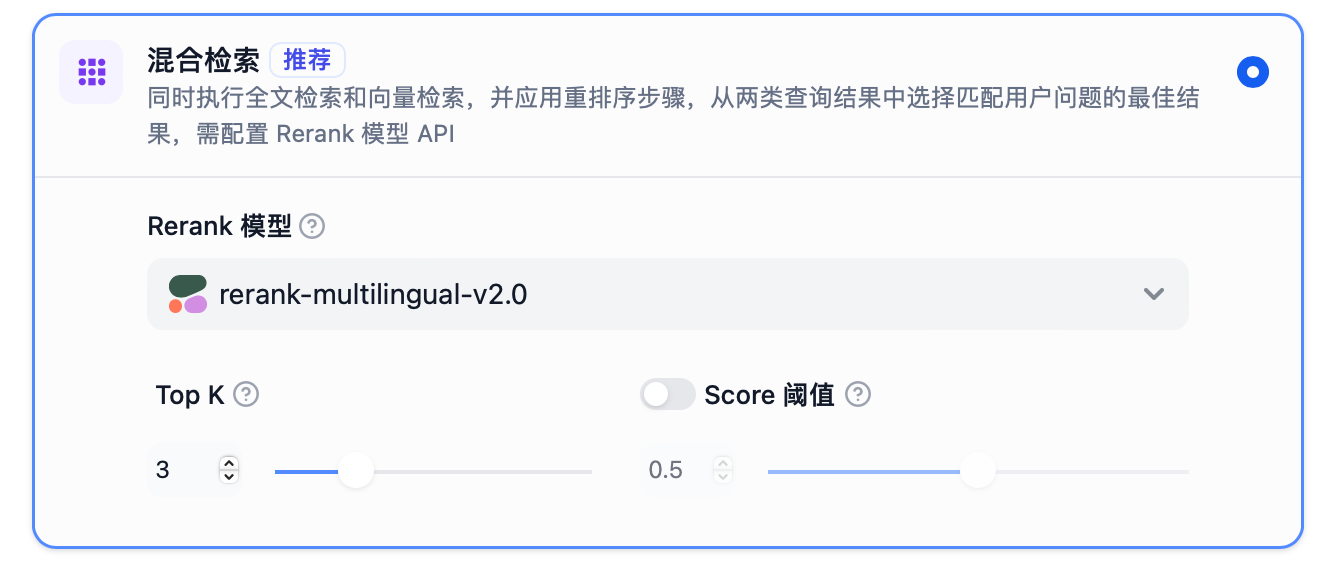 TopK: Used to filter the text fragments most similar to the user’s query. The system will dynamically adjust the number of fragments based on the context window size of the selected model. The default value is 3.
Rerank Model: After configuring the Rerank model’s API key on the “Model Providers” page, you can enable the “Rerank Model” in the retrieval settings. The system will perform semantic re-ranking on the recalled document results after hybrid retrieval to optimize the ranking results. When the Rerank model is set, the TopK and Score Threshold settings only take effect in the Rerank step.
TopK: Used to filter the text fragments most similar to the user’s query. The system will dynamically adjust the number of fragments based on the context window size of the selected model. The default value is 3.
Rerank Model: After configuring the Rerank model’s API key on the “Model Providers” page, you can enable the “Rerank Model” in the retrieval settings. The system will perform semantic re-ranking on the recalled document results after hybrid retrieval to optimize the ranking results. When the Rerank model is set, the TopK and Score Threshold settings only take effect in the Rerank step.
Setting Retrieval Mode When Creating a Dataset
Set different retrieval modes by entering the “Dataset -> Create Dataset” page and configuring the retrieval settings.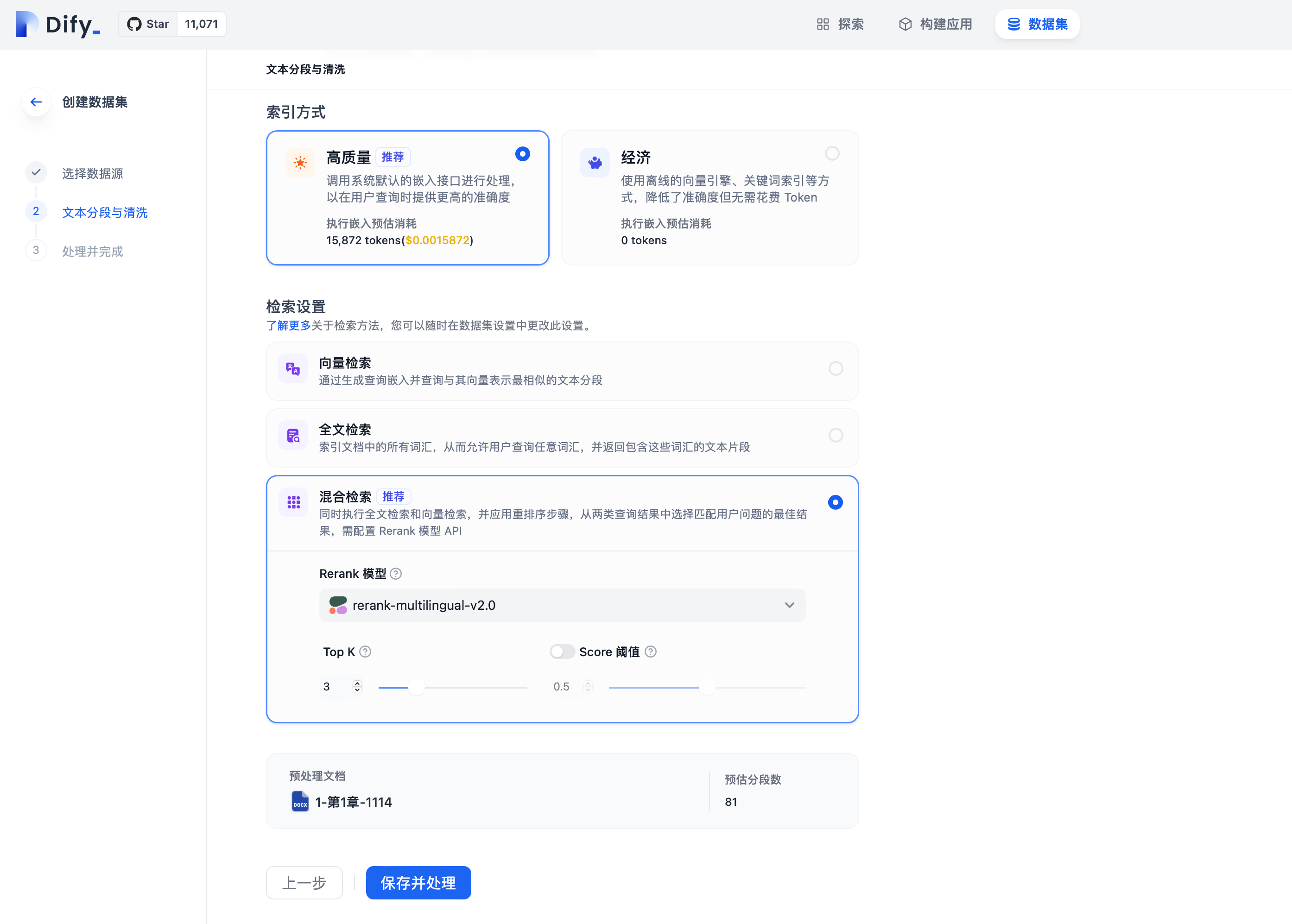
Modifying Retrieval Mode in Dataset Settings
Modify the retrieval mode of an existing dataset by entering the “Dataset -> Select Dataset -> Settings” page.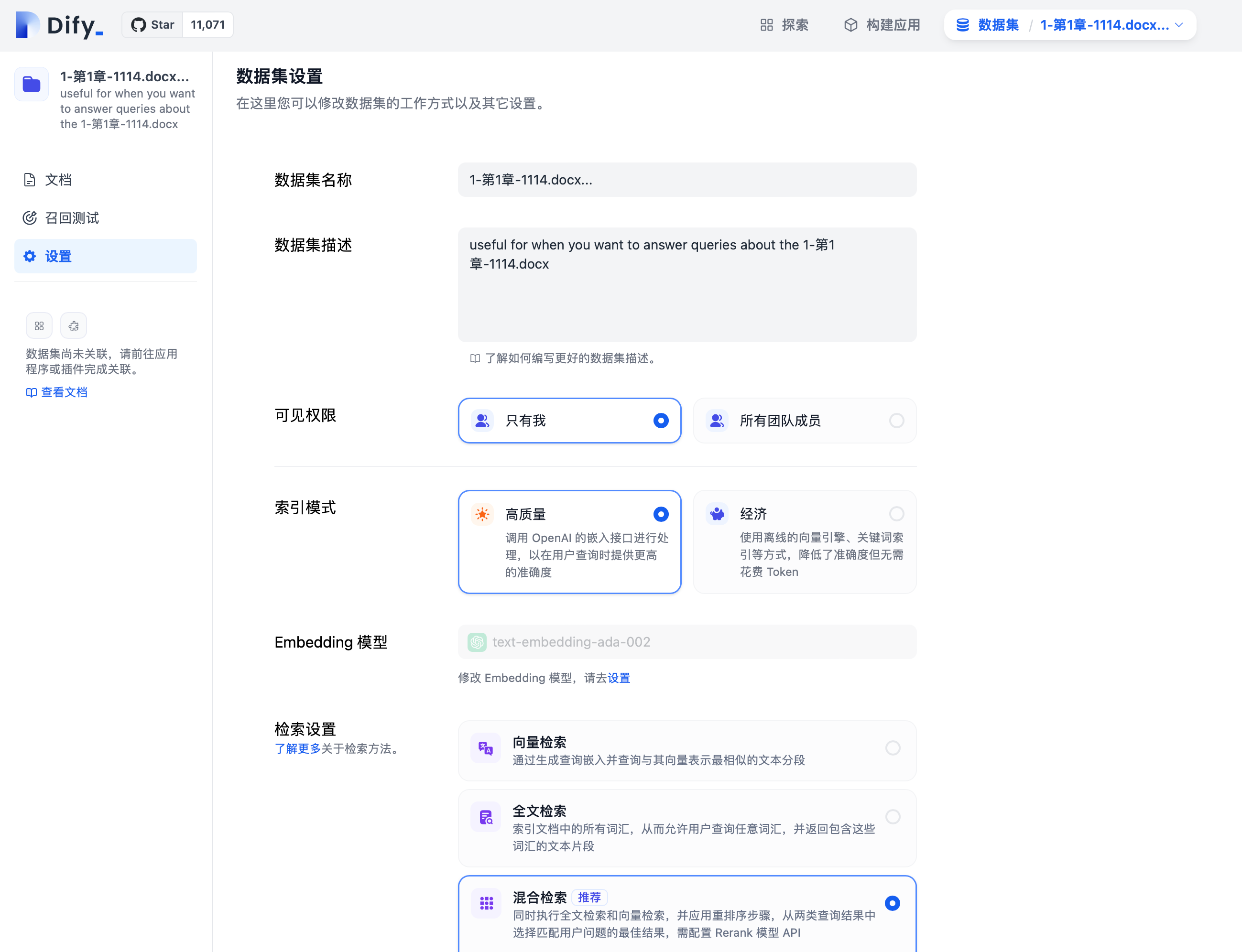
Modifying Retrieval Mode in Prompt Arrangement
Modify the retrieval mode when creating an application by entering the “Prompt Arrangement -> Context -> Select Dataset -> Settings” page.Edit this page | Report an issue