

- Dify plugin scaffolding tool
- Python environment, version ≥ 3.12
The Dify plugin development scaffolding tool, also known as dify-plugin-daemon, can be regarded as a plugin development SDK.
1. Installing the Dify Plugin Development Scaffolding Tool
Visit the Dify plugin GitHub page and select and download the version suitable for your operating system. Using macOS with M-series chips as an example: Download thedify-plugin-darwin-arm64 file from the project address mentioned above. Then, in the terminal, navigate to the file’s location and grant it execution permissions:
If the system shows an “Apple cannot verify” error, go to Settings → Privacy & Security → Security, and click the “Open Anyway” button.After running the command, the installation is successful, if the terminal returns version information like
v0.0.1-beta.15.
Tips:If you want to use the 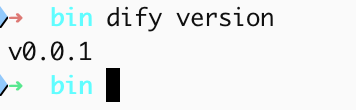
dify command globally in your system to run the scaffolding tool, it’s recommended to rename the binary file to dify and copy it to the /usr/local/bin system path.After configuration, entering the dify version command in the terminal will output the version number.2. Initialize Python Environment
For detailed instructions, please refer to the Python installation tutorial. Python version 3.12 or higher is required.3. Develop plugins
Please refer to the following content for examples of different types of plugin development:- Tool Plugin Development Guide - Hello World introductory tutorial
- Model Plugin Development Guide - Quickly integrate a new model
- Agent Strategy Plugin Development Guide - Create custom reasoning strategies
- Extension Plugin Development Guide - Implement external service integration via Webhook
- Plugin Packaging and Publishing - Publish your plugin
Next Learning Steps
- Dify Plugin Development: Hello World Guide - Start your first plugin development
- Developer Cheatsheet - Learn common commands and concepts
- General Specification Definitions - Learn about plugin metadata configuration
Edit this page | Report an issue